Git & GitHub Tab (Version Automation)
Creating games in Godot often generates panic in beginners when it comes to Committing dozens of obscure binary files (Scenes, Materials, Resources). Doing a Merge in the terminal is exhausting.
That's why Gamedev AI implements a native Git Tab inside Godot, designed exclusively for fluidity.
How to Use the Versioning Tab
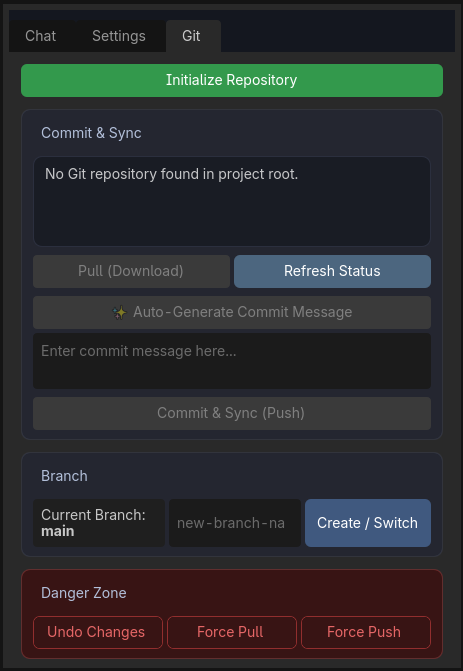
In the right window of the plugin, switch from the classic Chat or Settings tab to the top Git tab. There, you will see a simplified and modern visual version of the terminal:
1. Initialize & Connect
If the folder is not versioned, there will be a giant green "Initialize Repository" button. Then the panel will ask you to paste the GitHub URL of the Cloud Repo you created on the GitHub website.
2. Generate Commit Message ✨ (The Gold)
- You just programmed, changed 4 complex scenes, and redid scripts (
.gd). - Instead of thinking of a boring text for the Commit. Click on "✨ Auto-Generate Commit Message".
- Gamedev AI will do an invisible Diff. The artificial intelligence will look at absolutely all the deleted red and green codes you touched (e.g., added rolling logic to Player and fixed UI drag) and will create a super polished written summary in the box for you.
- Just click on Commit & Sync (Push). The AI uploads everything to the cloud instantly!
3. Isolated Branches (Timelines)
Are you afraid of breaking your Level_1.tscn scene that is perfect today while trying to test a new boss? Use the lateral Current Branch tab and click [Create/Switch]. Type test_boss and confirm. From then on, you are safe in an "isolated copy" of the code.
4. Panic Mode (Undo Errors)
The bottom panel holds the Super Actions:
- Undo Uncommitted Changes: Did the Godot engine blow up? Press this button and everything goes back to your last saved version on GitHub on the spot. A universal "Ctrl+Z" of the entire project.
- Force Pull Overwrite: Crushes your entire local folder, downloading and replacing it exactly with the state that is shielded in your cloud. A perfect lifesaver for programmers.
- Force Push: Crushes the cloud version with the local version. Use with care!