The Diff Screen (Green Light to Coders)
Gamedev AI writes code asynchronously. This means it rewrites your file and edits dozens of instances while you read the log in the engine. But wait, doesn't giving automatic write control to a bot on your .gd hard drive destroy the developer's authorial roots?
No! The Diff Screen secures your job and project without accidental scratches.
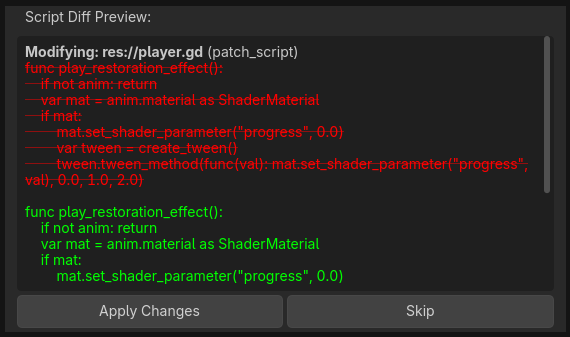
The Gamedev AI plugin implements the "Safe View Diff Window", comparable to the famous versioning views (GitHub/GitLens) in VSCode.
How the Diff Happens
- When asking to create or fix an
EnemyAttack.gd. The log indicates progress on the class metadata rewrite... - You will hear the visual "Ping" and a dark Diff tab with the words [Original Code] next to [New Code Changes] will instantly emerge invading the chat screen with text.
- Highlighted lines [color=red]in Red -[/color] represent dangerously deleted original code.
- Highlighted lines [color=green]in Green +[/color] represent the unprecedented injection of AI intelligence.
Apply or Skip (The Power of Rejection)
At the end of the Diff (Scroll the scroll-bar to the end or coldly analyze it), decisive security buttons appear:
- "Apply Changes": Gamedev AI will use the official Undo/Redo History Proxy from the Godot Engine and will modify the actual target script. If you hit
Ctrl + Zin the script, you'll go back before the AI took over. - "Skip" (Ignore): Hated the stiff LLM idea after the Diff? Press "Skip". No realistic line will be altered (not even in Cache) and there is no technical damage, only the tokens were burned.
(Visualize in practice how the Diff works:)